
- What is Open Source Hardware: A Philosophy of Repair and Freedom
- Tech Heart: Raspberry Pi Zero W and Key Features
- Printing details
- Interfaces and Compatibility
- Unique Features: Roll Printing and Design
- Roll Paper Support
- Aesthetics and Placement
- Economic benefit: how much does independence cost?
- Conclusion: The future you print yourself
The world of printing technology has long remained a closed and expensive ecosystem, where manufacturers dictated the terms, imposing proprietary drivers, high ink prices, and the infamous DRM protection of cartridges. However, a project has emerged on the horizon that aims to break this monopoly: Open Printer. More than just an inkjet printer, it’s a manifesto and a complete open source hardware platform designed for enthusiasts, makers, and anyone who seeks complete control over their tools.
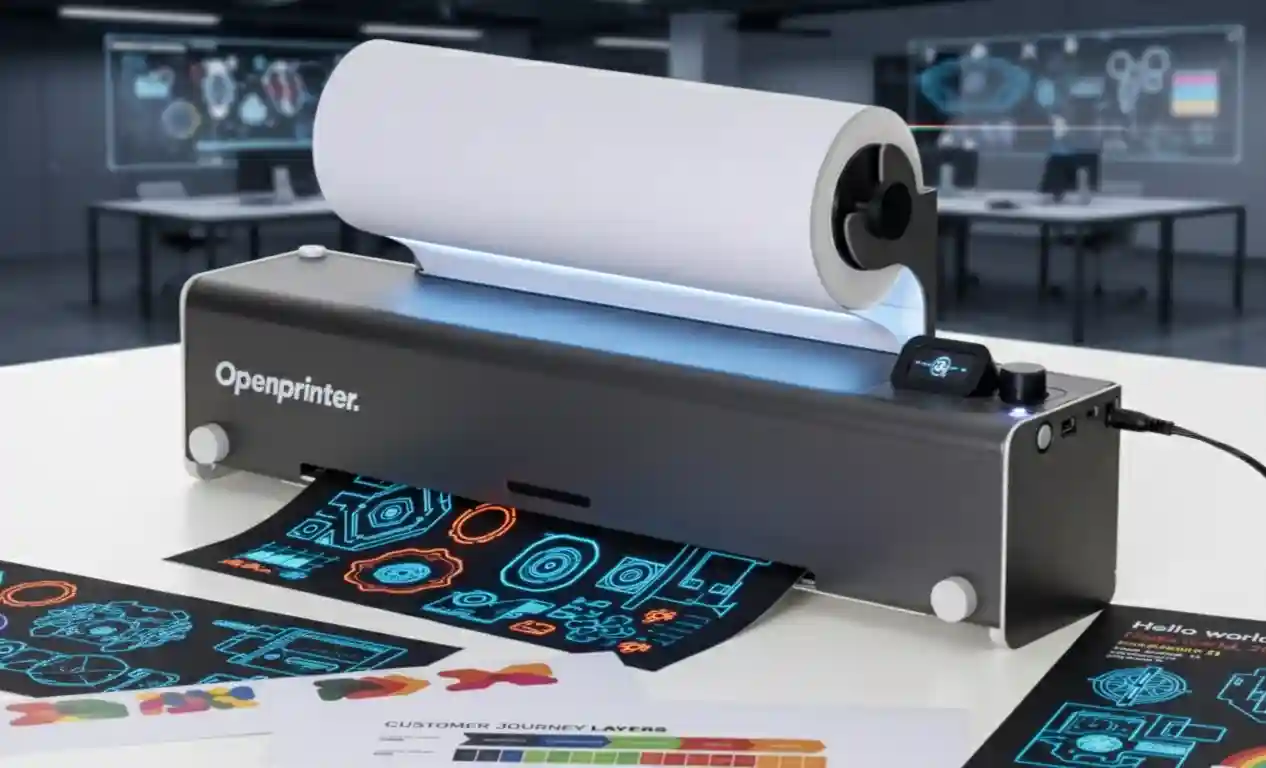
The idea originated on the crowdfunding platform Crowd Supply and quickly gained popularity thanks to its philosophy. The device is based on a miniature and powerful Raspberry Pi Zero W single-board computer, transforming an ordinary peripheral into a true DIY project. This allows users to not only build the printer themselves but also customize its functionality and design without restrictions.
What is Open Source Hardware: A Philosophy of Repair and Freedom
The key principle of Open Printer is the concept of open source hardware. Unlike proprietary software, where the user is dependent on the manufacturer, open hardware provides access to all technical schematics, drawings (CAD files), and firmware. This ensures the longevity of the device and prevents “planned obsolescence.”
- DRM-free: The biggest advantage is the ability to use DRM-free cartridges or refill genuine cartridges without software blocking. This significantly reduces printing costs and eliminates dependence on a single ink supplier.
- Full Modularity: All mechanical and electronic components are standard and readily available, making a repairable printer a reality. If something breaks, you replace the specific part rather than purchasing a new device.
- Educational potential: The project is an excellent educational platform for studying electronics, programming, and the mechanics of printing devices.
Tech Heart: Raspberry Pi Zero W and Key Features
As befits a true DIY printer, its “brain” is built on an affordable and flexible Raspberry Pi Zero W microcomputer. This small device controls all the main functions, including processing print data and managing network connections. The printing system is powered by an STM32 MCU microcontroller, which is responsible for precise print head positioning and cartridge handling.
Printing details
- Cartridges: Supports the popular HP 63 or HP 302 cartridges (depending on region), making them easy to find and refill. The printer allows you to use one cartridge (black or color) or both simultaneously.
- Print quality: The device provides high image quality: 600 dpi for black and white and an impressive 1200 dpi for color printing.
Interfaces and Compatibility
To ensure broad compatibility and ease of use, Open Printer is integrated with the open source print server CUPS (Common Unix Printing System). This ensures flawless operation with most modern operating systems, including Windows, macOS, Linux, Android, and iOS.
- Physical interfaces: Connection is via USB Type-C (to a computer) or USB Type-A for direct printing from external drives.
- Wireless Connectivity: Built-in 802.11ac Wi-Fi and Bluetooth 4.1 let you print wirelessly.
- Local control is via a miniature 1.47-inch TFT LCD display and a convenient jog wheel.
Unique Features: Roll Printing and Design
The developers of the Open Tools project went beyond simply creating an open-source inkjet printer. They added features often missing even in expensive commercial models, making this printer extremely flexible for makers.
Roll Paper Support
One of the most exciting features is the ability to print not only on standard sheets of paper (A4, A3, letter, tabloid) but also on paper rolls. This opens up new possibilities for creating long documents, banners, ribbons, or diagrams without the need to constantly load individual sheets. A built-in cutter automatically trims the paper to the desired size after printing.
Aesthetics and Placement
The printer’s compact and sleek design measures approximately 50 x 10 x 11 cm. Thanks to its elongated shape and clever mounting, the Open Printer can be placed not only on a desktop but also mounted on a wall, making it resemble a modern dispenser and saving labor.
Economic benefit: how much does independence cost?
While the price of the DIY kit may seem comparable to the cheapest commercial printers (at the time of the campaign’s launch), the true economic benefits of Open Printer become apparent over time. The average price of an original cartridge for a commercial printer is often $25-$50, and refills can cost up to $15-$25.
By using a DRM-free alternative and the ability to refill cartridges yourself, users significantly reduce operating costs. Investing in an open-source printer means investing in long-term independence from high ink costs and constant hardware replacement.
Conclusion: The future you print yourself
The Open Printer project is a perfect example of how open source and DIY principles can be applied to everyday, yet problematic, devices. It’s not just an alternative; it’s a challenge to the industry. It offers high-quality printing (1200 dpi), extensive capabilities (roll printing), and, most importantly, complete control over the hardware and software, making it an ideal choice for those who value freedom and maintainability in their technology.
Using the Raspberry Pi Zero W and open standards (CUPS), this modular printer offers a robust and flexible solution that can evolve with the needs of its community.



0 Comments