
Centralized Peripheral Power Tracking on Your Desktop
Wireless PC accessories have become standard equipment for productivity and everyday computing. Users frequently connect Bluetooth keyboards, mice, noise-cancelling headphones, and stylus pens to their primary workstation. However, monitoring remaining charge levels across multiple external devices simultaneously has historically been an awkward workflow in desktop operating systems. Checking whether your wireless mouse or headset is about to run out of battery during a critical project required opening system configuration pages and drilling down into connected peripheral menus.
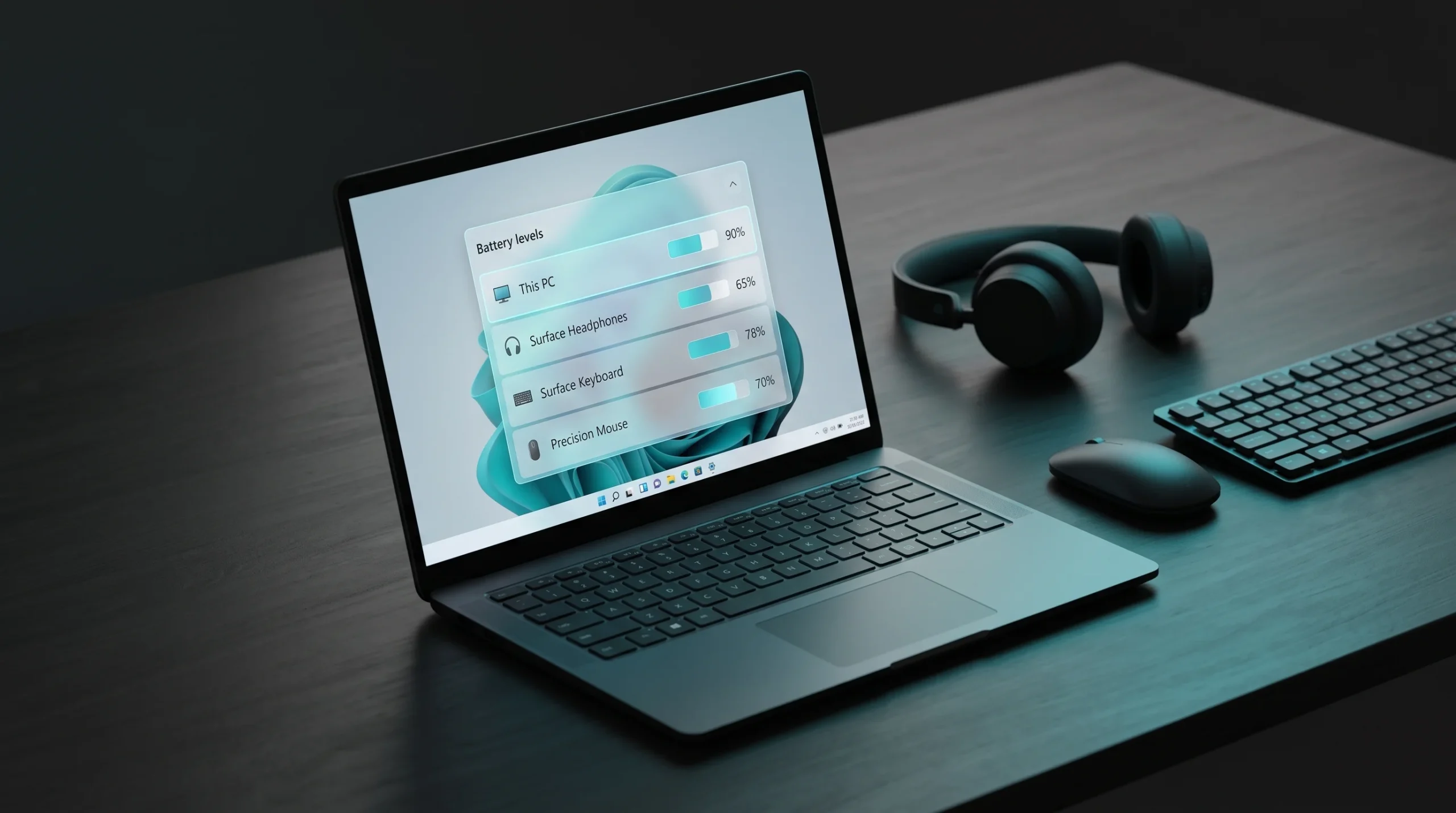
Microsoft addressed this workflow limitation by introducing a native battery tracking widget for Windows 11. The utility aggregates vital power telemetry from both the computer itself and all paired Bluetooth hardware directly onto the widgets board and the lock screen, significantly reducing friction in daily device management.
How the Unified Power Interface Operates
The layout of the battery widget follows an uncluttered list structure where each line item represents a connected peripheral. Next to the device name and corresponding hardware icon, the widget displays an exact percentage figure and a visual progress indicator. By reading data transmitted via standard Bluetooth Battery Service (BAS) profiles, the utility collects telemetry passively without increasing CPU cycles or degrading wireless signal performance.
The module automatically arranges listed accessories based on their current charge state or usage status. When a connected device reaches critical power levels below 20%, the widget dynamically alerts the user by tinting the battery gauge and elevating the item to the top of the interface. This setup eliminates the need to run multiple proprietary peripheral software packages in the background, freeing system memory and reducing startup clutter.
Lock Screen Integration and Fluent Design Styling
Beyond the primary widget dashboard, developers integrated battery reporting directly into the Windows 11 lock screen environment. This capability is particularly advantageous for laptop users who travel frequently. Opening the display lid or pressing any key presents a fast overview of all peripheral power levels before authentication occurs through Windows Hello facial recognition, fingerprint sensors, or PIN codes.
The visual execution adheres strictly to modern Fluent Design guidelines. It incorporates subtle backdrop blur acrylic materials, softly rounded corners, and clear Segoe UI typography. The widget responds seamlessly to changes in system themes, switching between light and dark palettes to maintain optimal readability under varying ambient lighting conditions without manual reconfiguration.
Technical Prerequisites and Communication Standards
To accurately capture battery statistics from external accessories, the widget relies on established industry protocols. Peripherals must satisfy several baseline specifications to report charge levels reliably inside the Windows interface:
- Bluetooth 4.0 Low Energy or newer hardware, ensuring communication packets transmit without battery drain.
- Firmware support for the Battery Service Profile (GATT Service UUID 0x180F) on the peripheral device.
- Updated host PC Bluetooth controller drivers compatible with Microsoft Bluetooth Stack version 10.0 or higher.
- Active Windows App SDK and Widgets Platform Runtime components for scheduled UI data refreshes.
For accessories connected via proprietary 2.4 GHz USB dongles rather than native Bluetooth radios, battery reporting depends on whether the vendor provides a compatible virtual communication driver. Standardizing these wireless communication pipelines remains an active area of collaboration between operating system developers and hardware vendors.
The Maturation of the Windows 11 Widget Platform
When the widget panel was initially introduced in Windows 11, early feedback often centered on its heavy reliance on web-based news feeds and commercial MSN modules. The ongoing addition of deeply integrated system tools, such as the battery monitor, CPU performance gauges, and network activity meters, marks a shift toward functional utility.
Closing this capability gap brings Windows on par with competing desktop and mobile operating systems that have long offered unified hardware monitoring. For enterprise workers and everyday enthusiasts alike, direct battery visibility provides practical insurance against unexpected hardware shutdowns during demanding workloads.


0 Comments