
- Active Cooling in Gaming Peripherals – Technical Experiment by Pulsar and Noctua
- Engineering Solutions and Structural Features
- Impact of Active Cooling on Ergonomics and Accuracy
- Battery Life and Operating Modes
- Detailed Analysis of Construction and Body Materials
- Configuration via Dedicated Software
- Wireless Performance and Latency Details
- Market Comparison and Technology Outlook
Active Cooling in Gaming Peripherals – Technical Experiment by Pulsar and Noctua
Long gaming sessions and professional esports competitions demand high standards of peripheral comfort. One of the most common issues players face is excessive palm perspiration. This reduces grip friction on the mouse body, causes accidental slips, and forces players to constantly wipe their hands during matches. Peripheral manufacturers have attempted to address this for years using textured plastics, rubber grips, or perforated shells. However, Pulsar and Noctua have taken a step further by creating a joint solution – the Feinmann F01 Noctua Edition gaming mouse featuring an integrated active air cooling system.
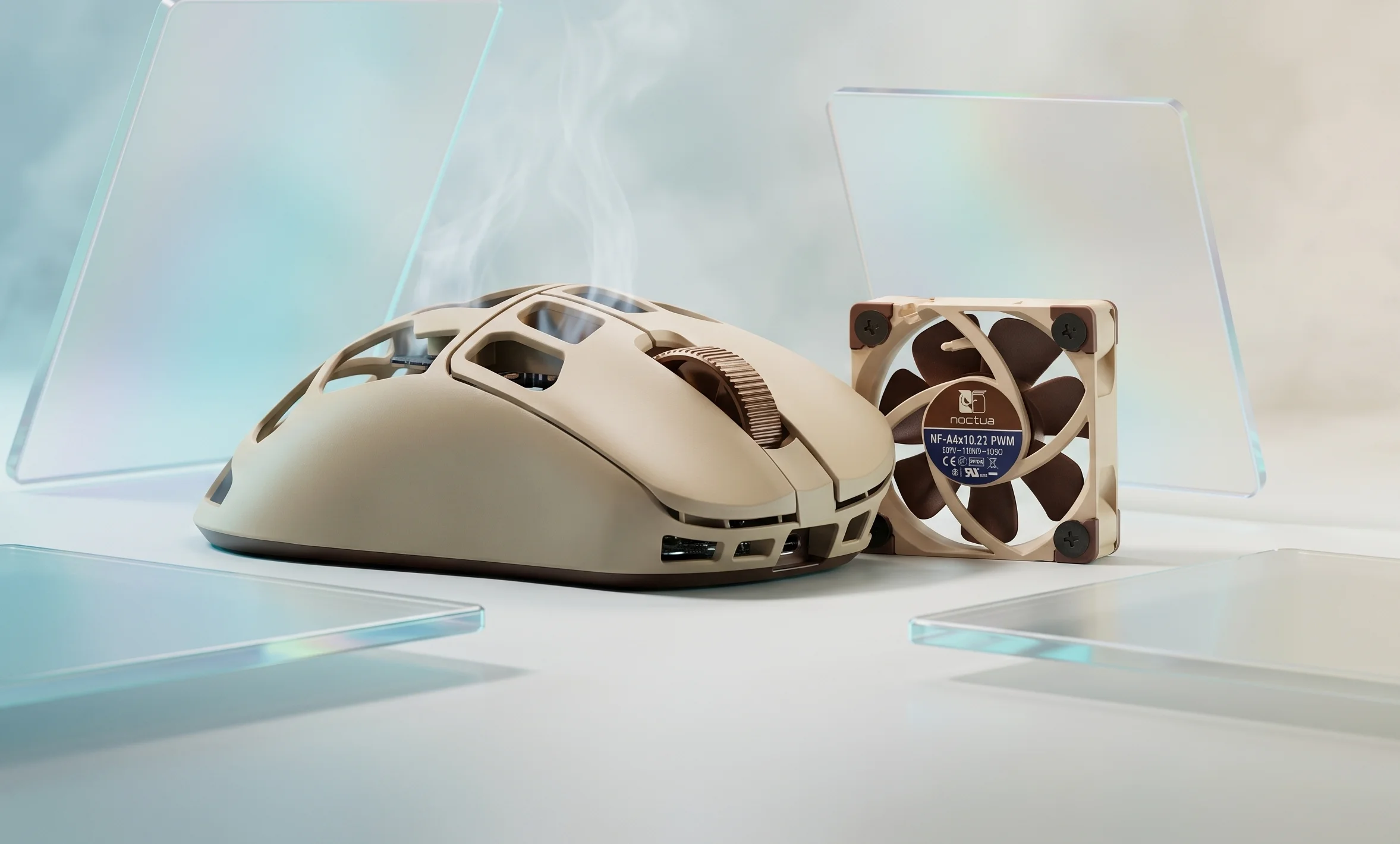
The defining feature of this model is the integration of a compact Noctua fan directly inside the mouse body. This approach provides a continuous airflow passing through the perforated top shell to cool the user’s palm. At the same time, the developers managed to maintain weight balance, ergonomics, and high technical performance required for precise tracking in fast-paced games.
Engineering Solutions and Structural Features
Noctua is renowned for its quiet and efficient PC cooling solutions. For the Feinmann F01 project, a specially adapted 40x40x10 mm micro fan from the NF-A4x10 5V series was utilized. Placed beneath the palm area of the top cover, it generates directed airflow without creating unwanted vibrations that could negatively impact optical sensor operation.
The mouse body is constructed from durable polymer in Noctua’s signature beige and brown color scheme. The upper section features large, custom-geometrical cutouts. These allow free air circulation while reducing the overall weight of the device. Despite housing an internal mechanical fan and dedicated battery, the total weight remains well within comfortable limits for wireless gaming mice.
Impact of Active Cooling on Ergonomics and Accuracy
The efficiency of palm air cooling relies on the evaporative cooling principle. Even a minor airflow is capable of maintaining an optimal skin temperature. This prevents sweat film buildup on the buttons and side grips. As a result, the player maintains a consistent grip throughout multi-hour gaming sessions.
Minimizing vibration was a crucial design priority. Small fans operating at high RPM often produce high-frequency hum and micro-vibrations. By utilizing Noctua’s proprietary SSO2 bearings and silicone anti-vibration mounts, body oscillations were effectively eliminated. The PixArt PAW3395 optical sensor tracks surfaces without jitter, which is critical for FPS games.
Battery Life and Operating Modes
Operating an additional mechanical component increases battery power consumption. To optimize energy usage, Pulsar’s software offers dedicated fan control profiles. Users can configure several modes
- Continuous Mode: Fan operates at fixed RPM for maximum cooling output.
- Smart Mode: RPM adjusts dynamically based on mouse movement or session duration.
- Eco Mode: Active cooling shuts off to conserve battery during office work.
With the fan running at medium speed, battery life reaches approximately 35-40 hours. When active cooling is disabled, battery life extends up to 80 hours in 2.4 GHz mode at a 1000 Hz polling rate.
Detailed Analysis of Construction and Body Materials
To achieve a low weight of 68 grams, engineers used high-strength thin-walled polycarbonate. The structural layout was computed using finite element analysis to remove unnecessary material from areas not subjected to pressing forces. Main switches are decoupled from the main shell, ensuring crisp tactile feedback without wobble or pre-travel.
Optical switches rated for 90 million clicks are used under the main buttons. Unlike mechanical switches, they do not suffer from double-clicking issues caused by metallic contact oxidation. The scroll wheel features a dustproof optical encoder protected from debris blown by the cooling fan.
Configuration via Dedicated Software
The Pulsar Fusion software suite allows fine-tuning of all mouse parameters. Users can adjust CPI sensitivity in steps of 50, tweak Lift Off Distance (LOD) between 1mm and 2mm, and construct complex macros. A dedicated section is assigned to cooling fan control.
The software allows users to sync fan speed with temperature profiles or game triggers. For instance, in strategy games, the fan can run at 30% power, while automatically scaling up to 100% when launching intensive first-person shooters.
Wireless Performance and Latency Details
Connection to the host PC is established via a 2.4 GHz wireless receiver. Thanks to low-latency transmission technology, response times match wired equivalents. Utilizing an optional 4000 Hz polling rate dongle reduces latency down to 0.25 milliseconds, guaranteeing smooth cursor tracking on high refresh rate displays (240 Hz and above).
Market Comparison and Technology Outlook
Previous attempts to integrate fans into mice were made by other brands, but most featured significant drawbacks such as excessive weight, high noise, and inferior sensors. The Pulsar and Noctua collaboration demonstrates a refined approach, combining a premium-grade fan with flagship internal hardware.
This product targets a niche of demanding gamers and esports professionals. While the 120 USD price tag places it higher than standard wireless mice, the unique cooling system and Noctua aesthetic offer distinct value for hardware enthusiasts.



5 Comments
68 grams with a fan and battery? hard to believe.. it probably creaks and flexes when squeezed, since the shell is full of holes like cheese. Anyone bought it yet, how is the build quality?
come on, classic noctua brown is a legend, but on a mouse it looks like a piece of vintage furniture)) why couldn't they make a black version? or is this strictly for fanboys?
wondering how to clean it from dust and sweat? the fan will suck all the dirt inside and a new civilization will grow there in a month) are there any filters or do I need to blow it with compressed air every day
come on, 17dB is only quiet on paper. tiny 40mm fans always make a nasty high-pitched whine at high RPM, no bearings will save it. anyone has experience with these micro fans, is it really silent?
35 hours of battery life is Way too low for 2026.. my regular mouse lasts for weeks. why buy this if u can just turn on AC or a desk fan? pure marketing gimmick imo